Showing posts sorted by relevance for query windows. Sort by date Show all posts

Collection Free Software of Tweaking Windows

Collection Free Software of Tweaking Windows
Collection Free Software of Tweaking Windows - Tweaking Windows or enable features or hidden windows settings is an interesting thing to do. Although it can be done manually such as by editing the Registry, but maybe not everyone can do. Fortunately, now many free software for tweaking windows.

Here's a collection of various free software that provides many features for tweaking windows.


TweakNow PowerPack 2012
An artificial tweaknow.com software that provides a variety of  tweaking windows  and optimization features. So many features included in the update and still to this day.Provides a common feature  tweaking windows , Cleaner, disk usage analysis, registry cleaner, the RAM optimizer, system information and more. 

Collection Free Software of Tweaking Windows

TweakNow PowerPack is more complete than  TweakNow  WinSecret. The program supports Windows XP, Vista, 7 and Windows 8. To download TweakNow PowerPack 2012 (9.1 MB) 


Ultimate Windows Tweaker
This may be a program with the most small size and portable. With just one exe file which is about 345 KB, Ultimate Windows Tweaker provides a variety of features ranging from tweaking windows system information, user accounts, performance, security settings,network, and various other  tweaking (total about 150 tweaking windows). 

Collection Free Software of Tweaking Windows

Just Supports Windows Vista and Windows 7.


X-Setup Pro
Tweaking the software was previously a paid software, but now a freeware or free.Tweaking windows has a feature very much, and perhaps the most comprehensive because it includes more than 1800 tweaking windows. Unfortunately, this software was not updated for a long time since windows 7. But for users of Windows XP, this programshould be an option. 

Collection Free Software of Tweaking Windows

In addition to the installer version, Portable version also available. Supports Windows9x/NT/2000/XP and Vista (from other sources also said to support Windows 7).

RegToy
As with X-Setup, RegToy is tweaking software that provides many features  tweaking windows . In addition to the installer version, available jug portable version. Not only tweaking the look and performance of windows, various features are also included in it such as hardware optimization, security, startup manager, service manager, uninstall, registry cleaner and backup, disk and other clean. 

Collection Free Software of Tweaking Windows

Unfortunately, this software was not updated for a long time yet, so it seems not to support windows 7. But for users of Windows XP and Vista could be an alternative software tweaking. To download RegToy (2:18 MB portable version and installer 1.63 MB) 


Advanced System Tweaker
This software can be said that the most recent, since 1:00 version just released a few days ago. Advanced System Tweaker is a free software that has made ​​Tweaking.com  tweaking windows  features, such as Maintenance (maintenance windows), optimization of speed and ulitily repair windows errors or other problems. 

Collection Free Software of Tweaking Windows

Advanced System Tweaker tweaking but it may not only suitable for repair if something goes wrong with the window itself. And one unique is the availability of the command command prompt / edit the registry manually for most of the tweaking that is used.Download and more information visit Advanced System Tweaker.


Mz Ultimate Tools
Software made ​​by Michael Zacharies (so-called MZ) has many features that quite a lot oftweaking, comparable to or TweakNow RegToy. The program is available for WindowsXP, Vista and Windows 7, and each is a separate application. So be sure to download according to the windoes we use. Has many features such as increased performance,tweak the display windows, security, memory, network, and many others. 

Collection Free Software of Tweaking Windows

This software last updated in December 2010, and unfortunately there are no more updates until today. Download  Mz Ultimate Tools.

Perhaps there are many more software tweaking the other windows, as some members of the other larger programs, such as Glary Utilities, Advanced System Care and so on.But the collection of the above may be sufficient for some of us who want to tamper with the settings windows without the hassle of dealing directly with the registry.
Read more ...

Free 5 Software To Make Bootable USB Windows

Free 5 Software To Make Bootable USB Windows
Free 5 Software To Make Bootable USB Windows - Now, to install Windows, we can do easily via USB memory stick. This is very useful, because maybe some PC / Laptop to get CD / DVD ROM, the alternatives have to use other media such as USB flash drives, SD cards, external HDD, etc.

In addition, alternative or CD-DVD, with USB-based storage media in the area, because we can do it only when necessary and may also be deleted, so do not need CDs or the radio, which are sensitive to fading. Here is a collection of free software that can be used tocreate a bootable USB, or installation of Windows.


WinUSB Maker
WinUSB maker is portable software to create an external storage media such as USB memory stick or external hard disk to be bootable and can be used to transfer theinstallation file (installation) of Windows for USB. 
Free 5 Software To Make Bootable USB Windows

Some features WinUSB Maker include:
  • Backup and recovery (including the MBR, Master Boot Record) with a USB-drive
  • Designed with maximum safety, to avoid and prevent errors errir reformat windows
  • Can work with Windows in a DVD, a folder or ISO
  • Formatting USB NTFS file system
  • You can create a DOS drive / USB bootable grldr
  • Copy files at maximum speed
  • Tool support for more than 1 TB
In addition, there are a number of other features that more can visit WinUSB Maker. This program can run on Windows Vista, 7.8 and Server 2008/2011 (and the need NetFramework 3.5.) 

Download WinUSBMaker.7z ( ~ 1.3 MB) 


Windows 7 SBB Tool
The program is small and portable can be used to create a bootable USB Windows 7, not just a USB stick, but supports SD Card. To create a bootable USB, we do not use the ISOimage (ISO file) of Windows 7, but we have to manually specify the location of the folder ofwindows (before we can copy from DVD to hard drive).

Free 5 Software To Make Bootable USB Windows

Download Windows 7 SBB Tool ( 245 KB) 


Passcape ISO Burner
Small and portable application PAsscape ISO burner, but the windows, and other ISO file from a bootable USB disk also is an application that creates a bootable CD / DVD, USBdevices (memory sticks, USB sticks, Compact Flash, Secure Digital USB hard disk, etc.)can be used to create.

Free 5 Software To Make Bootable USB Windows

Some features are as follows:
  • CD / DVD and USB drives to transfer files to the ISO
  • Bootable media creation
  • ISO file, unzip the contents to disk
  • A simple interface
This program can run on Windows XP or later. The download Passcape ISO Burner (314 kilobytes) 


A Bootable USB
Application of this is the program makers aksvg.com bootable USB to install windows 7.After the run, we can choose the install location of the file (I recommend selecting the same location with a Bootable USB, so it can be portable). To create a bootable USB Windows 7 required a minimum of 4 GB USB. 

Free 5 Software To Make Bootable USB Windows

This application can use the Windows 7 DVD or ISO file. And can run on Windows Vista,server 2008 or windows 7. To run it, we must go through three steps, Check USB Drive,USB Drive and choose Format DVD or ISO. Unfortunately after I try it on windows 7 (version0.9.0.4), when the step USB format, the process is stopped so that I can not continue andmust be closed by End Task. Probably from the Options menu to try the other settings when formatting the USB. 

Download A Bootable USB ( 996 KB) 


Novicorp WinToFlash
This application has been around long enough, and quite nice to create a bootable USB.Unlike most previous applications that only support windows vista or 7, WinToFlash can be used to create a bootable USB XP/2003/Vista/2008/7/8 windows.

Free 5 Software To Make Bootable USB Windows

Some WinToFlash features include:
  • XP/2003/Vista/2008/7/8 moving windows installation from CD / DVD to USB Flash Drive
  • Move WinPE onto a USB
  • Creating a USB Flash drive with Windows XP/2003 Emergency Bootloader
  • MS_DOS USB transfer
  • Creating a USB containing Windows XP/2003 Recovery ConsoleThis program can run on Windows XP/2003/Vista/2008/7 and windows 8. 
Download WinToFlash ( 6.9 MB)
Read more ...

Trick System Stability with Windows Reliability Monitor

Trick System Stability with Windows Reliability Monitor
Trick System Stability with Windows Reliability Monitor - For Windows users, it is not uncommon problems with system stability. It can be caused by a variety of program / ​​application either the default Windows or from third parties is problematic. To monitor the condition of the actual Windows already includes its own tools, one of which is the Reliability Monitor.

One of the features in Windows is the Event Viewer that can be accessed through the Control Panel> Administrative Tools> Event Viewer. Event viewer is already available in Windows XP, including Windows Vista / 7. But may read information from the EventViewer rather troublesome, and for users of Windows Vista / 7, there are interesting additional tools to monitor the stability of the Windows Event Viewer through this data,namely the Reliability Monitor.

Trick System Stability with Windows Reliability Monitor

Reliability monitor is a data visualization of the Event Viewer (available only in Windows Vista and Windows 7). Given this visualization, it is much easier for us to monitor the extent to which the stability of the windows or applications that run on windows. As well as Event Viewer, Windows Reliability Monitor will monitor every application that runs on windows and problematic , including information and warnings (warnings).


To access or open the Reliability Monitor, can be done in several ways, including: 
  • Open the start menu and select Run, then type the command perfmon / rel (no spacesbetween and perfmon / rel)
  • Another way is to open the Control Panel, then click the Action Center, and then just click the link or the Maintenance tab and click view reliability history 

Reliability Monitor can display the information in the daily range (days) and also in the weekly (weeks). To see days or weeks earlier, just click the left or right arrow button that appears beside the graph. 

Trick System Stability with Windows Reliability Monitor

There are five types of information that is monitored, that is the problem with the program/ ​​application (Application failures), problems with windows (Windows failures), other issues (Miscellaneous failures), Warning (Warnings) and information (Information). click on each column to see more detailed description underneath.
The graph is shown also provide information about the stability of the system at that time.The graph is displayed with a range of 1-10, a score of 10 indicates that the system is most stable when its value decreases indicate the system is unstable, and usually there is a problem in that section.
Read more ...

Top 10 Internet Browsers 2012

Top 10 Internet Browsers 2012 - Internet browser is an application to assist users in navigating the virtual world, each year Internet / Web browser that we use are always fix bugs, ranging from security, features, speed browsing and so forth.

According to the reviews / tests performed by toptenreviews.com in 2012, that this year there is a change from previously ranked number one occupied by the output of the Mozilla Firefox browser, but this year the first rank is taken over by the output google chrome browser.

In my own, Chrome is already worthy of occupying the first position, given in terms of chrome speed noticeably faster than other browsers and not only that chrome does not burden the CPU as well, when browsing activity. Simply look at the review below.

Top 10 Internet Browsers 2012
1. Google Chrome
Google Chrome
Specification & Reviews:
Security:
Anti-virus.
Anti-spyware.
Private mode.
Clear data.
Anti-Phising.
Pop-up blocker.

Speed:
Navigation Time: 4,4 second
Average Startup Time: 4,3 second
Initial Startup Time: 4 second

Rating:
Security: 5 Star (Excellent)
Feature Set: 5 Star (Excellent)
Help & Support: 5 Star (Excellent)
Easy of Use: 5 Star (Excellent)
Speed & Compatibility: 5 Star (Excellent)

Feature:
Integrated search engine, Tabbed browsing, Auto fill, Customization options, Save tabs, Rss feeds, Bookmarks, Password manager, Automatic update, Zoom, Find-On page function, Synchronize, Spell check, Add-ons, Open source development, Thumbnail preview, Seamless download manager.

Operating System:
Windows XP, Windows Vista, Windows 7, Mac OS.

>>> Click here to download Google Chrome

2. Mozilla Firefox 
Mozilla Firefox
Specification & Reviews:
Security:
Anti-virus.
Anti-spyware.
Private mode.
Clear data.
Anti-Phising.
Pop-up blocker.

Speed:
Navigation Time: 5,7 second
Average Startup Time: 6,3 second
Initial Startup Time: 6,3 second

Rating:
Security: 5 Star (Excellent)
Feature Set: 4,5 Star (Excellent)
Help & Support: 5 Star (Excellent)
Easy of Use: 4,5 Star (Excellent)
Speed & Compatibility: 5 Star (Excellent)

Feature:
Integrated search engine, Tabbed browsing, Save tabs, Auto fill, Bookmarks, Customization options, Automatic update, Rss feeds, Find-On page function, Password manager, Parental controls, Add-ons, Zoom, Open source development, Spell check, Synchronize, Seamless download manager.

Operating System:
Windows XP, Windows Vista, Windows 7, Mac OS.

>>> Click here to download Mozilla Firefox

3. Internet Explorer 
Internet Explorer
Specification & Reviews:
Security:
Anti-spyware.
Pop-up blocker.
Anti-Phising.
Anti-virus.
Private mode.
Clear data.

Speed:
Navigation Time: 4,5 second
Average Startup Time: 4 second
Initial Startup Time: 4,3 second

Rating:
Security: 4,5 Star (Excellent)
Feature Set: 5 Star (Excellent)
Help & Support: 5 Star (Excellent)
Easy of Use: 4,5 Star (Excellent)
Speed & Compatibility: 4,5 Star (Excellent)

Feature:
Integrated search engine, Tabbed browsing, Save tabs, Autofill, Bookmarks, Customization options, Rss feeds, Password manager, Automatic update, Zoom , Find-On page function, Add-ons, Thumbnail preview, Parental controls, Synchronize.

Operating System:
Windows XP, Windows Vista, Windows 7, Mac OS.

>>> Click here to download Internet Explorer

4. Opera 
Opera
Specification & Reviews:
Security:
Anti-spyware.
Pop-up blocker.
Clear data.
Anti-Phising.
Anti-virus.

Speed:
Navigation Time: 4,5 second
Average Startup Time: 4,4 second
Initial Startup Time: 5,1 second


Rating:
Security: 4,5 Star (Excellent)
Feature Set: 5 Star (Excellent)
Help & Support: 5 Star (Excellent)
Easy of Use: 4,5 Star (Excellent)
Speed & Compatibility: 4,5 Star (Excellent)

Feature:
Integrated search engine, Tabbed browsing, Save tabs, Autofill, Bookmarks, Customization options, Automatic update, Password manager, Rss feeds, Zoom, Find-On page function, Spell check, Add-ons, Thumbnail preview, Synchronize, Seamless download manager, Voice interaction, Mouse gestures.

Operating System:
Windows XP, Windows Vista, Windows 7, Mac OS.

>>> Click here to download Opera

5. Safari Apple 
Safari Apple
Specification & Reviews:
Security:
Anti-spyware.
Pop-up blocker.
Private mode.
Clear data.
Anti-virus.

Speed:
Navigation Time: 3,8 second
Average Startup Time: 3,7 second
Initial Startup Time: 4,2 second


Rating:
Security: 4,5 Star (Excellent)
Feature Set: 4 Star (Very good)
Help & Support: 4,5 Star (Excellent)
Easy of Use: 5 Star (Excellent)
Speed & Compatibility: 4,5 Star (Excellent)

Feature:
Integrated search engine, Tabbed browsing, Save tabs, Autofill, Bookmarks, Customization options, Automatic update, Rss feeds, Find-On page function, Password manager, Spell check, Add-ons.

Operating System:
Windows XP, Windows Vista, Windows 7, Mac OS.

>>> Click here to download Safari Apple

6. Maxthon 
Maxthon
Specification & Reviews:
Security:
Anti-spyware.
Pop-up blocker.
Clear data.
Anti-virus.

Speed:
Initial Startup Time: 8 second
Average Startup Time: 5,9 second
Navigation Time: 3,2 second


Rating:
Security: 4 Star (Excellent)
Feature Set: 4 Star (Very good)
Help & Support: 5 Star (Excellent)
Easy of Use: 4,5 Star (Excellent)
Speed & Compatibility: 4 Star (Excellent)

Feature:
Integrated search engine, Tabbed browsing, Customization options, Save tabs, Rss feeds, Bookmarks, Password manager, Zoom, Find-On page function, Add-ons, Mouse gestures, Synchronize.

Operating System:
Windows XP, Windows Vista, Windows 7, Mac OS.

>>> Click here to download Maxthon 

7. RockMelt 
RockMelt
Specification & Reviews:
Security:
Anti-spyware.
Pop-up blocker.
Clear data.
Anti-Phising.
Anti-virus.

Speed:
Navigation Time: 11,1 second
Average Startup Time: 4,3 second
Initial Startup Time: 9,5 second


Rating:
Security: 4 Star (Very good)
Feature Set: 4 Star (Very good)
Help & Support: 4 Star (Very good)
Easy of Use: 4 Star (Very good)
Speed & Compatibility: 4 Star (Very good)

Feature:
Integrated search engine, Tabbed browsing, Save tabs, Autofill, Bookmarks, Customization options, Automatic update, Rss feeds, Seamless download manager, Find-On page function, Password manager, Add-ons, Zoom.

Operating System:
Windows XP, Windows Vista, Windows 7, Mac OS.

>>> Click here to download RockMelt 

8. SeaMonkey 
SeaMonkey
Specification & Reviews:
Security:
Anti-spyware.
Pop-up blocker.
Clear data.
Anti-Phising.
Anti-virus

Speed:
Navigation Time: 3,8 second
Average Startup Time: 4,5 second
Initial Startup Time: 5,7 second


Rating:
Security: 4 Star (Very good)
Feature Set: 3,5 Star (Very good)
Help & Support: 3 Star (Good)
Easy of Use: 4 Star (Very good)
Speed & Compatibility: 4 Star (Very good)

Feature:
Integrated search engine, Tabbed browsing, Save tabs, Autofill, Bookmarks, Open-source development, Customization options, Automatic update, Rss feeds, Zoom, Find-On page function, Speel check, Add-ons.

Operating System:
Windows XP, Windows Vista, Windows 7, Mac OS.

>>> Click here to download SeaMonkey 

9. Deepnet Explorer 
Deepnet Explorer
Specification & Reviews:
Security:
Anti-Phising.
Clear data.
Pop-up blocker.

Speed:
Navigation Time: 6,3 second
Average Startup Time: 3,5 second
Initial Startup Time: 4,1 second


Rating:
Security: 2,5 Star (Good)
Feature Set: 4 Star (Very good)
Help & Support: 4 Star (Very good)
Easy of Use: 4 Star (Very good)
Speed & Compatibility: 4,5 Star (Excellent)

Feature:
Integrated search engine, Tabbed browsing, Customization options, Save tabs, Rss feeds, Bookmarks,  Zoom, Find-On page function, Mouse gestures, Add-ons.

Operating System:
Windows XP, Windows Vista, Windows 7, Mac OS.

>>> Click here to download Deepnet Explorer 

10. Avant Browser 
Avant Browser
Specification & Reviews:
Security:
Clear data.
Pop-up blocker.


Speed:
Navigation Time: 6,4 second
Average Startup Time: 5,4 second
Initial Startup Time: 6,6 second


Rating:
Security: 2,5 Star (Good)
Feature Set: 4 Star (Very good)
Help & Support: 4 Star (Very good)
Easy of Use: 4,5 Star (Excellent)
Speed & Compatibility: 3,5 Star (Very good)

Feature:
Integrated search engine, Tabbed browsing, Customization options, Save tabs, Rss feeds, Mouse gestures, Bookmarks, Find-On page function, Password manager, Add-ons, Zoom.

Operating System:
Windows XP, Windows Vista, Windows 7, Mac OS.

>>> Click here to download Avant Browser

This is Top 10 Internet Browsers 2012, may be useful for you.
Read more ...

Simple Performance Optimization of Windows with Boost

Simple Performance Optimization of Windows with Boost
Simple Performance Optimization of Windows with Boost - Talk about Windows optimization, we may not be familiar with the term "Tweaking" or"tweaking", the term to enable or disable hidden features. Previously I had to reviewvarious software tweaks for windows such as Mz Ultimate Tools, X-Setup Pro, RegToy,TweakNow also Ultimate Windows Tweaker.

Despite all the above tools can be said to be complete, but the majority of all the optionswe have to choose yourself. Although it gives us the freedom which will be onoptimization, but not infrequently some of us are confused or do not know / understandwhat is going on optimization. Therefore there is now a much simpler alternative, and wedo not need to be confused when they want to make tweaks to optimize Windows, Simple Performance Boost.

Simple Performance Optimization of Windows with Boost

With a small program, free and portable Simple Performance Boost, we can furtheroptimize Windows XP, 2003, Vista, Windows 7, 8 or Windows 2008. The program isdesigned to perform system optimization (both stability and speed), but still done by selecting the most secure way, so to minimize the negative effects are undesirable.
Each "tweak" conducted by the program is only a small effect, but when many parts areoptimized, the performance obtained can be quite large.


Tips and Usage

When first run this software, it creates a registry backup (system configuration) to be changed, so that when there is a problem after using this software, it will easily be restored to its original state.

There are 4 view (tab) provided: Welcome, General Tweaks, Tweaks Networking & Service and Visual Tweaks. Start of Welcome, we can just click Next, Next to the endand kQ Apply Tweak it, after that restart and see how the optimization that we get. Buthere are some general explanation of each tab are available:
  • Welcome, contains only preliminary only, and the "Open Backup File Location" torestore the settings to a previous state through a data backup that was made.
  • General Tweaks, contains various general optimization, from memory, the Boot /Shutdown, files or hard disk optimization, as well as some other optimizations. Illustratethe details of each option can be found at the bottom when the cursor / mouse is movedon the option.
  • Networking Tweaks: contains optimization associated with the network (network).Service Tweaks: contains optimization service windows such as: disable pengindexactivate the search (which just worsens the performance of the system), help services,and other
  • Visual Tweaks: unbiased optimization-related problems or the effects of displaywindows. If you want high performance and does not require a display and a variety ofeffects here is optimization.
For those who already understand some tweaks that are provided, can sort out which ones will be optimized as needed. But for the beginners, the choices included is enough and can directly perform the optimization with the click Apply Tweaks. Optimization of only a few require restarting the computer next to the effect seen.

Simple Performance Optimization of Windows with Boost

How to tell windows to increase performance? If we do not feel the performanceincrease, one way to check whether there is an effect or not is through the use of Memory(RAM). Check through Task Manager (Ctrl+Alt+Del) and select the Performance tab,and then compare it with previous use of Memory.
Read more ...

An Easy Way to Make a Bootable USB Drive with Rufus

An Easy Way to Make a Bootable USB Drive with Rufus
An Easy Way to Make a Bootable USB Drive with Rufus - Not infrequently some of us are faced with obstacles that require the computer booting from a USB flash drive (flash). For example, should re-install windows, Linux, update the BIOS, Recovery password or to just check and analyze the operating system. One free and portable software that we can use is Rufus.

Previously I've had to review a variety of free software to create a bootable Windows (see 5 Software Free make Bootable USB Windows). Now there is another free software and other portable that is no less good, which is Rufus. Even the software is not just for windows installation alone but more than that.

Rufus is a small, lightweight utility that can be used to format and create a bootable USBFlash drive (flash, memory stick, etc.). By Rufus we can use for various things, such as:
  • Want to install the operating system of either Windows or Linux USB
  • Want to work with devices such as hard drive no operating system is its
  • To flash the BIOS or firmware update from DOS
  • To run software that requires access to low level, such as low-level format 

Some Advantages of Rufus
Although previously I cover a variety of software to create a bootable USB, but some onlyfor Windows and some are also limited to Windows Vista / 7 only. Another case with Rufus, despite its small size, Rufus has several advantages, including: 
  • The process of creating a bootable USB relatively quickly (even compared to softwarelike UNetbootin to create a bootable Windows 7 is almost 2 times faster)
  • There are options that include a FreeDOS, so useful for example to upgrade the BIOS or DOS utility other
  • Size is very small (only 146 KB and 407 KB without FreeDOS with FreeDOS) andportable (no install)
  • The existence of the feature to check the existence of "bad blocks"
  • Can be used to create a bootable USB variety of operating systems (Windows and Linux) and recovery utility. Learn to see the description below 


Use
Use of this software is very easy, after the USB is attached, run Rufus. It will appear as it does when going to format in Windows, with some additional features, such as USBFlash drive information, file system, cluster size selection, Create a new label, check the bad block, quick format, add your own label and icon and the file selection ISO. 

An Easy Way to Make a Bootable USB Drive with Rufus

When creating a bootable USB, there is the option to make bootable MS-DOS, FreeDOS, or from an ISO Image file. Where do we get the ISO file? To get the ISO file that contains the operating system, we can make it from the CD / DVD windows, Linux or otherwise using such software ImageBurn.
After setting the selection is complete, we just click the Start button to begin creating a bootable USB flash drive and wait until the process is complete.
Read more ...

How to Reset Windows 7 Password Without Reset Disk

How to Reset Windows 7 Password Without Reset Disk - On this time, I will tell you how to reset Windows password 2000/NT, Windows XP, Windows Vista, Windows 7 Ultimate / Premium / Starter / professional and Windows 8. To reset the password you do not need reset disk and don't must have special abilities such as: 
- Ability programming 
- Install the program / software on the PC is locked 
- Knowing the sole administrator and user passwords 
- And also you do not need a lot of time 

Now, would you think what you need and how?. Well, you only need: 
- A spare CD / DVD or USB stick 
- Software Reset Password Pro 
- And a few minutes. 

How to Reset Windows 7 Password Without Reset Disk
Before I explain the steps you have to do, first you should to have software Password Reset Pro, to get it you can download a software Reset Password Pro by Click Here!. 

If you have downloaded the software Reset Password Pro, let's look at the steps, as you will be able to reset windows password in just three steps, namely: 
- Download software Reset Password Pro, the first step you have done. 
- Then, burn to CD / DVD or USB stick, this step is often called a "boot disk". 
- Last reset your Windows password, you will see the list of Administrators and Users software registered to the locked PC. Then select the account and press Reset! 

After doing the three-step process is completed. When you log into windows there will be no request to enter a password. If you want to know more detailed steps and advantages of the software Reset Password Pro, you can read it Here!.

Hopefully this article can help you reset your Windows password. Good Luck...
Read more ...

Three Best Tools To Ease Your Windows

Three Best Tools To Ease Your Windows - Not much different with the development of other technology goods, computer jobs created for helping people who need them. But for some people, computers are goods that are difficult to use. That's why they reasoned that they could not work fast in use. 

Three Best Tools To Ease Your Windows

It was a spur humans to create a device that can quickly finish the job. Be it software or hardware. Here Any Tricks will review a little software application that will allow you to manage your PC.


FreeCommander
FreeCommander is an alternative to the default Windows file manager. This application will help you a daily struggle with Windows. With this FreeCommander application, youcan find the necessary functions to manage data stored on your hard disk. You can also take FreeCommander anywhere. Things you need to do is copy the installation directory to a CD or flash so it can use it on another PC. You can Download the official website located at www.freecommander.com 

Three Best Tools To Ease Your Windows


Xplorer2lite
Let's say you think, that you like from windows ekplorer complexity can be reduced. That picture explorer2lite. This application has two versions of the pro and lite. In comparison to its Pro version, lite version is much simpler. But important as are all of his remains. Xplorer2Lite offer two panels and tab folders, a feature to the efficiency of the Windows file management work. Features - features that are not owned flagship Windows Explorer, among others, synchronize folders, view side-by-side and internet search. Xplorer2lite advantage is that its interface can be adjusted as needed. Download in www.zabkat.com/x2lite.htm 

Three Best Tools To Ease Your Windows


Wireshark
This application is one of the Network Protocol Analyzer is the most widely used. This program lets you capture and interactively browse the computers on the network traffic. If you're an IT practitioner, Wireshark is one of the tools you need to have compulsory. Beyond that, it is possible this program can be use by a novice user, for example by parents who want to keep an eye on your home activities. You can go straight to the official website at www.wireshark.org / download.html to download it.

Three Best Tools To Ease Your Windows


Hopefully with Three Best Tools To Ease Your Windows, can increase your desire to manage your PC. However, many applications are almost similar to the one mentioned above. But most often used is the author of three applications.

*Good luck*
Read more ...

Ashampoo WinOptimizer 8 v8.13-TE

Ashampoo WinOptimizer 8 v8.13-TE

Ashampoo WinOptimizer 8 v8.13-TE - TE group bring us newest version of well known WinOptimizer. The completely new interface of Ashampoo WinOptimizer 7 combines newly developed modules with optimized tried-and-tested modules to create a perfect synthesis of system tuning, maintenance, and reliable protection. The latest generation of Ashampoo WinOptimizer has a fresh look and feel that is inspired by the user interface of Windows® 7. The all-in-one interface allows fast access to the integrated function groups. There’s no need to get frustrated with your PC or give up on your system. Just sit back and relax. Ashampoo WinOptimizer 7 is the maintenance specialist for your computer.
Ashampoo WinOptimizer 8 v8.13-TE

Notes:
Over 13 years of experience in system maintenance and
optimization of operating systems by Microsoft stand for modern
technology, efficiency, security as well as intuitive user
guidance.

Over 100 improvements were incorporated into the new Ashampoo
WinOptimizer 8 by contrast to its predecessor Ashampoo
WinOptimizer 7. This results in more speed and therefore improved
efficiency especially within system maintenance and the
adjustment of Windows. The cleaning modules registry optimizer,
Internet cleaner and drive cleaner , for example, reach a plus of
up to 500% in results.

In real time the new live tuner pools all available resources in
exactly those places where they are urgently needed. Existing
processor cores, Windows priorities and assigned usages of
applications are customized, in order to ensure a trouble-free
workflow. The resource-saving live tuner runs in the background
just a mouse click away.

Its so easy to tune Windows Just answer a few special
questions about your personal requirements concerning your
Windows system and our tuning assistant will automatically
choose all suitable options.

The concept of the all-in-one user interface has been developed
further for the Ashampoo WinOptimizer 8. Via the clearly
structured main window you can immediately access all six
function groups, in which over 20 modules with hundreds of
options and functions are assembled.

One aim, one tool, a perfect result

System maintenance
Optimal system maintenance through efficient cleaning and
defragmentation
One-Click Optimizer: Quick system optimization with just one
click
Drive Cleaner: Finds and deletes redundant files
Registry Optimizer: Finds and deletes unnecessary or faulty
entries in the registry
Internet Cleaner: Traces left behind when surfing the Internet
are erased
Defrag 3: Defragmentation of hard drives (pro-active
defragmentation and boot-time defrag

System analysis
Transparency and comparability with the help of information and
diagnosis tools
System Information: Comprehensive and clear information on
installed hardware and software (operating system, processor,
chip set, drives, etc
DiskSpace Explorer: Analysis of file groups, e.g. audio or
video files, and information on their space consumption
System Benchmark: The performance of the main memory is
determined and the processor is tested. The results can be
compared online with the ones of other users
Disk Doctor: Hard drives are checked for errors and faulty
files can be restored

Improvement of performance
Get rid of unnecessary droppings in performance with integrated
management and tuning modules
Service Manager: Optimization and management of installed
services and own rating of services
StartUp Tuner: Management of applications that are launched
when Windows starts
Internet Tuner: Automatic or manual optimization of the system
settings for the hardware and bandwidth of the Internet
connection
Process Manager: This module gives an overview about all
currently running processes
UnInstall Manager: Uninstalls applications and faulty entries
successfully

File tools
A set of tools to delete and encrypt files and folders as well as
to restore and send files
File Wiper: Irrevocable and safe deletion of files and folders
File Encrypter & Decrypter: Encrypt and decrypt files
File Splitter & Joiner:Splits a file into several small ones,
in order to, for example, send them by e-mail and merge them
again afterwards
Undeleter:Restores accidentally deleted files

Windows customization
Perfect configuration of the Windows operating system and
adjustment to own requirements
Tweaking: The access to a lot of hidden system settings enables
a detailed customization of the system and frequently used
applications
AntiSpy: Adjustment of interfaces and hidden options in
Windows, in order to disable undesired data transmission
File Associator: Management of installed data formats as well
as repairing or deletion of faulty data formats
Context Menu Manager: Manages context menus of the Windows
explorer and helps with the adjustment to individual
requirements
Icon Saver: Saves the icon positions on the desktop and
restores them, if necessary

General
Comfortable backup management and customization of modules
Backup Management: Management of existing backups
Tuning Assistant: Helps new users to optimize their system
Task planner: Planning of tasks and their automatic execution
at an appointed time
Settings: Settings for this software and single modules can be
adjusted.

Requirements
Operating System
Windows XP, Windows Vista and Windows 7 (32bit/64bit)

Computer
Any computer that runs one of the above operating systems at a
reasonable speed

Main Memory (RAM
The size of the main storage is insignificant for the
employment of the program. We refer to the recommendations of
the operating system in use from Microsoft.

Hard Drive Space
60 MB for the program files plus some additional space for
backup files (minimal
Features:
* New all-in-one interface for intuitive operation and efficient workflow
* Automatic system analysis on start of the program
* Disc Doktor for hard drive maintenance
* Service Manager including online connection
* StartUp Tuner including online connection
* File Associator for automatic checking and repair of faulty file associations
* Improved scan algorithms for better cleaning results and greater security

Download Ashampoo WinOptimizer 8 v8.13-TE Here
Read more ...

Set Windows Right-Click Menu With FileMenu Tools

Set Windows Right-Click Menu With FileMenu Tools
Set Windows Right-Click Menu With FileMenu Tools - The existence of a variety of menu when we right click on Windows, either the file or folder is pretty much help us accelerate the work. But it is not uncommon right-click menu(context menu) too much and sometimes it feels slow to appear. The solution is to set up their own menu with free software FileMenu Tools.

When adding the program / ​​software is not uncommon these software add menu when we right-click the file or folder. Maybe some of the menu is quite helpful, but if too much,sometimes inconvenient when I have to choose the menu and roads that do usually do uninstall the program. Even sometimes the menu we never used at all.

Set Windows Right-Click Menu With FileMenu Tools

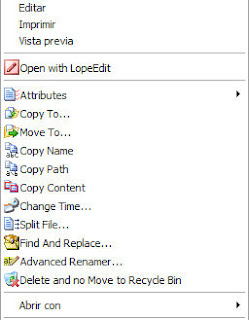
With FileMenu Tools, we can make the right click menu (context menu) windows. Some features include:
  • Adding a menu to run the operations of the selected file or program
  • Add specific commands that can run the program or other application, do the copy / move to a specific folder or even to delete certain files
  • Setting the menus that appear on the menu "Send to .."
  • Enable or disable the menu that was added by another application or program
  • Adjust or shift the position of the menus that appear

FileMenu Tools provides an innate feature that we can add the context menu (right-clickmenu windows), such as Find and Replace, Delete locked file, Permanent Delete,Change Icon, Run the file with a particular argument or parameter (for file exe, com, andbat) , do the copy / move files, copy files and other locations. Learn to see the features inherent file operations in FileMenu Tools. 

Set Windows Right-Click Menu With FileMenu Tools

Use of FileMenu Tools
After the run, are 3 main menu shown in Tab, the Commands of FileMenu Tools, "SendTo ..." menu and Command of other applications. Each user can be briefly described as follows:
  • Commands of FileMenu Tools, to add a right click menu on a file or folder. We can choose a variety of options or parameters of the properties and perform actions from the Action
  • "Send To ..." menu and, for the set menu on the sub menu "Send to ..."
  • Command of other applications, to organize the various right-click menu in Windows and is usually added by other applications. Having removed the check mark, click the icon "Apply changes", then right-click menu will automatically disappear / appear without having to restart.

This application is very useful, especially when you right-click menu too much, so it is necessary to disable (remove) the menus that we rarely use, or when we are doing operations on files / folders and would like to add right-click menu for quick do the job.

The program can be used for Windows XP, Vista and Windows 7 both 32bit and 64bit.In addition to the installer version is available, there is also a portable version. To use,please download FileMenu Tools (Installer 6.5 MB and 5.7 MB Portable)
Read more ...

Does a Apple Mac Need Antivirus Protection Software

Does a Apple Mac Need Antivirus Protection Software
Does a Apple Mac Need Antivirus Protection Software - Just over a season ago, Mac customers began to feel a bit more Windows-like after a significant Mac Trojan viruses equine was discovered in the wild. Of course, you’d get it only if you obtained duplicates of stolen application. While there had been a few existing OS X viruses reviews, this Trojan viruses had the most dangerous potential to date.

Since that rumble last season, the Mac security front has been relatively silent. This indicates the concern that has been on many individuals' thoughts and one I get asked on a daily basis: “Why never Apples get viruses?”

Of course, we know the concern is certainly not legitimate. Apple Mac can be assaulted as confirmed earlier. Even The apple company indicates operating some type of anti-virus application on your Mac and included one with a Mac registration. Additionally, numerous security faults are discovered and The apple company produces regular security updates to spot them up.  So, a better concern might be “Why never Mac customers have to worry about viruses like Ms Windows customers do?” I suppose a relatively variety of visitors have dynamic anti-virus application operating on their Mac, despite Apple’s suggestions. For requirements of simpleness, we’ll lupm viruses, malware, spyware, worms and trojan's under the typical term of “viruses.” Here are the typical reactions given and my take on them.


Macs Are not Popular

Why do individuals rob banks? Which is where the cash is! (Sutton’s Law). Because Windows-based pc systems signify around 90 percent of the industry, viruses authors get more hit for their money. Not only does a Ms windows viruses propagate further and quicker due to its numbers, but the individuals writing viruses are more likely to have Ms windows machines upon which to value. And the financial institutions are operating Ms windows as well, so Ms windows is where the cash is.

Of course, when The the apple organization company provided Intel-based pc techniques, some were worried that Celery would get germs PC because they were managing the same processor. The Nick change was a authentic issue, but for a different objective. If inexpensive PCs could be changed into Celery, the enemy could use that to their benefits and start expanding. Coughing the Mac OS to run on a PC would offer an simple way for germs writers to find the Mac OS.

However, as the Mac’s reputation has increased, we have not seen a rise in viruses for the Mac. Popularity is a weak reasoning.


Macs Don’t Sustain In reverse Compatibility

Since 1984, The apple company has made several changes in its os strategy. First there was the switch from processor Power PC to 68K, and then the switch from Classic to OS X,  and then finally the switch from PowerPC to Intel based processors. That old duplicate of MacWrite or NetTrek will not run on your new MacBook without significant emulation and other chicanery. On the other hand, WordPerfect 5.1 for DOS operates great on a Ms windows 7 PC with just a slight modify.

Microsoft, to be able to keep interface with older products, has never fully excised old value and faults in its os. The apple company has been willing on at least three events to completely get away from old application and start from the begining. Because The apple company manages the components and the application and has a much smaller set up base, it is better located to create these serious goes.

Ironically, Apples used to get plenty of virus in the System 7 days. I lovingly keep in mind “Disinfectant,” and plenty of  viruses  propagate via poor hard drive. As the Traditional OS progressed, less and less  viruses  worked before OS X rewrote the OS book. Which leads to the final purpose for the lack of Mac nasties.


Macs Were Designed with Peace of mind in Mind

Since The apple company realized about Mac viruses, it was able to upgrade the os with shields in place to prevent viruses episodes. The proper use of the Manager account and value was the most important key in avoiding the propagate of any Mac viruses. For those different, on a Ms windows XP PC, applications can set up instantly without webmaster name and value. While Windows vista and Ms windows seven ask authorization sometimes, you can still quickly set up applications (and therefore viruses) without mediation from a person.

Alternatively, Mac applications needs someone with Manager benefits to be able to set up most application. In my day job as a pc technical, plenty of Mac customers cannot even keep in mind their own value, so they are extremely unlikely to unintentionally set up some application. Ms windows PCs are usually contaminated by hitting some type of link followed by Ms windows instantly setting up a viruses in the background without person approval or mediation. This idea is as foreign to Mac customers as a .dll file.

Because The apple company has a quicker schedule in upgrading and patching its os, any drawback that is discovered and recognized by The apple company can quickly be repaired via an upgrade or the next os. Getting The apple company to recognize some of these faults is a different tale, though Snow Leopard provided security against the trojan's discovered last season.

Do you run anti-virus application on your Mac?
Yep
Nope
View Results
Share ThisPolldaddy.com
Should You Run Mac Antivirus Software?

Good issue. The the apple organization company said at one time it suggested anti-virus program (though later it recanted), yet most Mac clients never. The risks of a germs on your Mac are smooth and protection program is identified as decreasing down pc techniques and being usually force seat. Versus most other program, germs protection needs a yearly fee to keep protection powerful. If you keep away from the red lighting area on the On the internet, you are much less likely to get a germs. Make sure that your system value is a fantastic one and difficult to think. Guide of any program you acquire and examine the resource. Which is why you get the warning now whenever you acquire application from the On the internet. Sensible exercise is your first range of resistance.

Personally, at home, I have ClamXav installed. It’s a free program that will check out your Mac to determine if you have a viruses, but will not pre-emptively protect you from getting one. It’s an “on-demand” compared to an dynamic reader. I upgrade and run it every so often after I hear of some new risk.

For my perform pc, I have Intego VirusBarrier installer. This method is discreet and has little or no impact on the performance of my Mac small. Because I perform with a lot of customers, I cannot always guarantee that they have not downloadable an Online Unpleasant and I never want to catch what they have on their PC.

The choice is yours whether to run anti-virus application. The reasons why Apples never get many  virus are as much according to fortune and industry conditions, as they are on built in security. At the very least, besides a excellent management value, a Mac on the Online should have a duplicate of ClamXAV on it that can be run at the first hint of problems and modified after a alleged break out. Furthermore, keep in mind that “social engineering” threats, like phishing messages that attempt to grab your account details can affect Mac and Ms windows customers similarly. Remain on your feet and never react to surprising messages that try to turn you into viewing a website that needs your value or other private information.
Read more ...