Showing posts with label Tutorial. Show all posts

How to Reset Windows 7 Password Without Reset Disk

How to Reset Windows 7 Password Without Reset Disk - On this time, I will tell you how to reset Windows password 2000/NT, Windows XP, Windows Vista, Windows 7 Ultimate / Premium / Starter / professional and Windows 8. To reset the password you do not need reset disk and don't must have special abilities such as: 
- Ability programming 
- Install the program / software on the PC is locked 
- Knowing the sole administrator and user passwords 
- And also you do not need a lot of time 

Now, would you think what you need and how?. Well, you only need: 
- A spare CD / DVD or USB stick 
- Software Reset Password Pro 
- And a few minutes. 

How to Reset Windows 7 Password Without Reset Disk
Before I explain the steps you have to do, first you should to have software Password Reset Pro, to get it you can download a software Reset Password Pro by Click Here!

If you have downloaded the software Reset Password Pro, let's look at the steps, as you will be able to reset windows password in just three steps, namely: 
- Download software Reset Password Pro, the first step you have done. 
- Then, burn to CD / DVD or USB stick, this step is often called a "boot disk". 
- Last reset your Windows password, you will see the list of Administrators and Users software registered to the locked PC. Then select the account and press Reset! 

After doing the three-step process is completed. When you log into windows there will be no request to enter a password. If you want to know more detailed steps and advantages of the software Reset Password Pro, you can read it Here!.

Hopefully this article can help you reset your Windows password. Good Luck...
Read more ...

Tips Conversion to PDF from Office 2007

Tips Conversion to PDF from Office 2007 - For users of Office 2007 to convert documents to PDF format sometimes have to use the program from outside, such as PDF Creator. But in fact Microsoft itself has made the Add-ins for Office 2007: Microsoft Save as PDF.

With Add-in, we can directly convert PDF document to Office 2007 with good quality.

I usually convert to PDF using PDF Creator program such as, but yesterday when I convert a document containing the text (letters) Arabic, in fact the result is not satisfactory, not to mention the page layout is not standard to make the results were not exactly match the original.

After trying several free online PDF conversion service, almost no one gave the most (just like the original). This may be due to an Arabic text (Unicode) were included.

Well, Microsoft Save as PDF is an Add-in (extra program) for Microsoft Office 2007, so that the documents we have in Office 2007 format can be directly converted into PDF with quality results and like the original document.

Supported operating systems are: Windows Server 2003: Windows Vista: Windows XP Service Pack 2. Microsoft Save as PDF and supports 8 format Office 2007, namely:
- Microsoft Office Access 2007
- Microsoft Office Excel 2007
- Microsoft Office InfoPath 2007
- Microsoft Office OneNote 2007
- Microsoft Office PowerPoint 2007
- Microsoft Office Publisher 2007
- Microsoft Office Visio 2007
- Microsoft Office Word 2007

In addition to Microsoft Save as PDF Add-In there is also a Microsoft Save as PDF or XPS with similar fungi, but with the additional conversion into a format fokumen XPS (XML Paper Specification).

Directions for Use
  1. Download Microsoft Save as PDF (915 KB) or Microsoft Save as PDF or XPS (934 KB)
  2. Install SaveAsPDF.exe or SaveAsPDFandXPS.exe (select one)
  3. Once completed, then we can convert documents to PDF or XPS Office 2007 via the main menu. The trick: instead of the document you want converted to Office 2007 menu and then Select Save as> PDF or XPS (or PDF only)
Tips Conversion to PDF from Office 2007

If you want to uninstall the add-in can be done through Control Panel> Add / Remove Programs and select Microsoft Save as PDF [or XPS] Add-in for 2007 Microsoft Office programs for the remove.
Read more ...

Trick to Choose Amazon Keyword Affiliate Marketing

Trick to Choose Amazon Keyword Affiliate Marketing - In building the Amazon website, we need to do keyword research. Of course, keyword research to monetize different Amazon research for Adsense website.

Keyword research on the Adsense website prioritized on keywords with high CPC (minimum $ 1). Not so with Amazon blog keyword research.

Trick to Choose Amazon Keyword

Before we perform keyword research keyword or Amazon, we should first know the situation of the target market and general conditions relating to products Amazon will we sell.

Some things to consider before the keyword research for the Amazon website:
  1. Best Sales Category Amazon (Amazon product categories where sales are seasonal busy at certain times)
  2. Spring (March-June): It is better to choose the products in the category of toys, baby supplies, garden tools, school supplies
  3. Summer (July - Sept): It is better to choose products such as sunglasses, bicyle, camping equipment, security tools, garden applience, skin care, ac
  4. Autumn (Oct - Dec early): in this season, choose the products whose sales increased as a jacket, gift ideas, warm clothing, heating, snow removal tool
  5. Winter (Dec end - Feb): at this season, just continue to sell the items you have selected in the fall.
Several factors are also worthy of consideration in choosing a product Amazon:
  • We recommend choosing disposable products or products that fast expiry date (easily broken) in the hope would happen repeat purchases by visitors to your site.
  • Choose products that become the primary or secondary need products that are rarely found in retail stores
  • Choose products that can be used as a collection and regular
  • Choose products which can be used as gifts and ordinary
  • Choose the appropriate seasonal produce in season. If relying on traffic from search engines, blogs should be up in advance. For example, you choose to sell camping equipment summer, then as much as possible and have an online website so minimal in spring.
  • Make sure the product is still there (in stock).
Read more ...

Tricks Choosing the Best Keywords For Adsense

Tricks Choosing the Best Keywords For Adsense - Choosing keywords for your website is one of the most important thing, especially if you are studying to play the adsense. Proper keyword research will help to accelerate the arrival of thousands of $ $ $. This time I will share tips on choosing keywords for your website, hopefully can provide additional knowledge to you.

Tricks Choosing the Best Keywords For Adsense

In the selection of keywords there are some things you should take it, and you have to do this yourself if you want to become a truly IM dasyaaaaat .... Because the level of success you had fun one-adsense is influenced by this.

Choosing the Best Keyword Tips For Your Adsense Web:
Choose keywords on local visits 10,000 (for the "Phrase") and above 3000 (for [Exact])
Choose a low level of competition, a maximum take under 5 million, is still above with ease.
See the quality of your competitors backlinks.
What is the value per clicks you can peg how many samples you want to min $ 5 or $ 20, so if you throw it under it.
Search Keyword Home, try keyword that has a lot of derivatives within the meaning of the keyword is still common but not too common. Like "disease" is still too common, but if you could take into consideration of the four tips above.

There are many other way, I will be posting additional, but all the tips above, according Tricks Any yes ... Maybe you can get more information Based on your opinion. Hopefully can provide a solution for you.

But tips on choosing keywords above would be useless if you do not do it soon, so immediately action to find out what the most appropriate keywords for your website. And if possible you should also do some research as to what techniques to find keywords that you think.
Read more ...

Promo MacX DVD Ripper Pro, Video Converter Pro & WinX DVD Ripper Platinum

Promo MacX DVD Ripper Pro, Video Converter Pro & WinX DVD Ripper Platinum
Promo MacX DVD Ripper Pro, Video Converter Pro & WinX DVD Ripper Platinum - One vendor software audio / video Digiarty, during the next few days to give the promo a paid software that can be used and downloaded for free. The software is Win MacX HD Video Converter Pro, MacX DVD Ripper Pro, WinX DVD Ripper Platinum.

If you need software for video conversion, or to keep from DVD into a smaller format while maintaining video quality, this promo is an opportunity that can be used, or if not able to add a collection of video converter software that we already have.


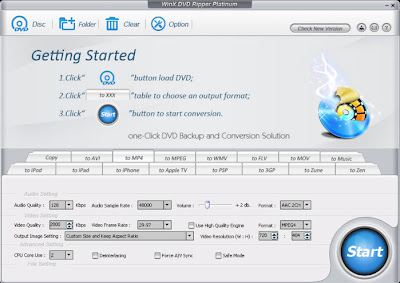
WinX DVD Ripper Platinum
Previously I've had to review this software and it has a feature that is quite a lot. Some features include:
  • The conversion process Utilizing Multi-core CPU
  • DVD copy protection that uses the latest techniques
  • Provide a variety of presets (many ready-made settings)
  • Supports various output formats: 3GP, MP4, AVI, MPEG, H.264, FLV, MWV, etc.
  • Regulate its own range of audio / video settings
WinX DVD Ripper Platinum

More can visit our DVD Ripper Platinum. To use, please Download the program from this link Winx-dvd-ripper-pt-summer-ed.exe (18.4 MB)

(version 6.8.5) and then install and once done, use the license code is: AA-VEVSVTVD-HFGGIB (Activate before the date of May 22, 2012). Promo page can be visited from a link giveaway


MacX DVD Ripper Pro for Mac & Windows
Despite its name using a Mac, but this software is not only available for Mac operating system, but for Windows as well. Actually has a feature similar to WinX DVD Ripper Platinum (and it seems this application is the same, just using different names). Some of them are Ripping DVD includes the use of protection, output various video formats and devices (gadgets) and others.

MacX DVD Ripper Pro

To download visit the page Giveaway and click the big button Giveaway. Or directly download from the following link:
After the download (download) just open the zip it and in it there setup (installer) and the license code in the text file to activate this program (valid until before May 23, 2012).


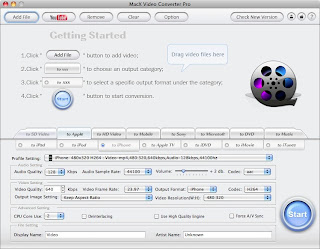
MacX Video Converter Pro (Windows and Mac)
Still from the same giveaway page, Digiarty also give promo video converter software MacX Video Converter Pro for Mac and Windows. This software has many features video conversion, among others:
  • Output to various devices and PC gadgets 
  • Supports a variety of formats, such as M2TS, MKV, AVCHD, MTS, MPEG, AVI, WMV, MP4,  FLV, MOV, RMVB, RM, Google TV, WebM, and other
  • SD (Standard Definition) video and Conversion of either HD (High Definition)
MacX Video Converter Pro

More information can visit the page MacX HD Video Converter Pro for Windows from macxdvd.com. To be able to get this software and free license, visit the giveaway page and at the bottom there untu guessing game that featured movie titles (if any of us can repeat until the correct answer). Or directly download from the following link:
Included in the zip program (installer) and also licenses its code.
Read more ...

Download GIMP Graphics Processing Software 2.8 (Free)

Download GIMP Graphics Processing Software 2.8 (Free)
Download GIMP Graphics Processing Software 2.8 (Free) - If we are processing an image (images) and needs a full-featured graphics software like Photoshop but free, GIMP is probably the answer. And the good news, a few days ago gimp.org just released a new version with a range of exciting new features.

GIMP (GNU Image Manipulation Program) is one of the graphics processor for free (open source) are the most popular. In addition to being one of the main graphical editor in Linux, the installer is also available for other operating systems like Mac OS X, Windows, FreeBSD and Sun OpenSolaris. So users of Windows (7, Vista, XP SP3, can take advantage and use it for free.

Last time I tried GIMP is quite old and rarely used, because it saw its use is somewhat complicated, especially with the appearance of each window (tool) are separate, so each time have to adjust the location of each of these tools. Moreover, who are used to using Photoshop, are usually not comfortable with the separate window.

GIMP image editor version 2.8

But it seems to be starting to change since the release of GIMP 8.2 in early May 2012 ago.Versi 2.8 brings many changes and complicated impression seems to be fading before. Moreover, if we look for alternative software photoshop class (rich editing features) are free, GIMP is probably the answer.


Various new features
GIMP 2.8 comes with new features, including which is the main demanders of previous users. Here are some new features of GIMP 2.8 is quite important:
  • Multi-Column Window Dock, allowing display many windows (tool) in a column with drag & drop. This feature is very useful for a wide monitor or multiple monitors.
  • Single-Window Mode, after all this time-window using a separate window (toolbox, layer, the main editor, etc.), in version 2.8 we can take advantage of features of single-window mode. With this feature, all tools will be attached to the main application, like Photoshop. This feature can be activated via the menu Window> Single-Window Mode.
  • Layer Groups, to unite two or more layers into a group, are very useful when working with multiple layers and need grouping.
  • Save and Export appear in a separate menu for easy
  • Simple Math In Size Entries, you can insert mathematical operators such as addition, multiplication when resizing the image.
  • On-Canvas Text Editing , the features to edit text directly on canvas (drawing), without having to display a separate window as in previous versions.
It was just a few new features in version 2.8 of this, and many other features that further improve the quality of this software. For the new features of this version can read the release notes More Gimp 2.8, whereas for a more complete range of features of the GIMP, please see page features

Once installed and tried GIMP 2.8 on Windows 7, is quite different from the GIMP that I've ever tried before, its use was more easy, relatively fast image processing, the use of tools more easily. A menu similar to photoshop that is useful but not yet included in the default installation is a "save for web" (save image optimization for the web with a minimum size). But it's easy to be overcome by adding plugins such as RIOT. Or if no plugin could just use the menu menu> Export to a few optimization steps.

Save For Web Riot

With the release this version, it looks like I'll start using GIMP from the previous shift that is always hanging with Photoshop (which increasingly require high computer specs, not to mention to get the licensing price is still pretty fantastic).

Want to try? visit our Download GIMP (72.6 MB)
Read more ...

Fix Corrupted File or Document with File Repair

Fix Corrupted File or Document with File Repair
Fix Corrupted File or Document with File Repair - Destruction of documents or files on your computer can sometimes occur due to various reasons. If that happens and we can not open a file with the application as usual, there is an application or a free program (freeware) that we can try to fix it, namely File Repair.

Corrupted files can be caused by many things, such as electrical problems (eg sudden death), network connection problems (when downloading files), viral infections, and other application program error. If the file has not been severely damaged, we can try to fix with one of these free software File Repair.

Microsoft Word

Repair files created with one purpose, to fix the damaged file and try their best to retrieve the data that allows still legible. Supported file types are:
  • Excel spreadsheets (.XLA, .Xls, .Xlsx)
  • Word documents (.Docx, .Docm, .Doc, .Rtf)
  • GIF, JPEG,  BMP, TIFF, RAW images or  PNG (. Jpeg, .Jpg, .Tiff, .Gif,  .Png, .Bmp)
  • RAR archives or Zip ( .Rar, .Zip)
  • videos (.mpg, .mp4, .avi, .flv, .mov, .asf, .wmv)
  • PowerPoint presentations (.Ppt, .Pptx, .Pps)
  • PDF documents (.Pdf)
  • Audio (. Mp3,. Wav)
  • Access databases (.Accde, .Mde, .Accdb, .Mdb)
While the list of errors that may still be improved include:
  • Unable to read file, the application can not read file
  • file is not in a recognizable format, or file format is not recognized by the application
  • file can not be accessed, file or document can not be accessed
  • out of memory errors, errors or low system resources (memory error or a problem with a small memory systems)
  • application can not open the type of file represented by filename, the application can not open a file type with the file name
Seeing functions of this application is worth a try for those who are experiencing problems with the files are corrupted. But not all the files damaged beyond repair, if damage is severe or the contents of the file is compromised by virus, it is likely the file will not be repaired at all.

File Repair

Use of this program is very easy, just click the button with our three points to open the file, then click the Repair button. If the process is successful, then the file will be corrected with a name like that is in the Output fixed file as. This application can only be used to fix the files one by one.

If Information File Repair can not fix damaged file, they also take syndication via e-mail to damaged file repair for 1-24 time tried. If it is not very essential data (sensitive or confidential), records can be sent to the e-mail repair@filerepair1.com.


additional tips
There are other tips that might be tried as File Repair can not open the file. ekxtensi replace one with another file. For example, the damaged Excel file (extension. Xls), can we try to change. Doc (or other extension) and open it with Microsoft Word (or another application), this method may still be able to read some of the contents of the file. But this will not be able to document with the extension docx, xlsx and pptx.

File Repair download (1.02 MB) Click Here.
Read more ...

Comparison Applications Android and Applications Apple

Applications Android Vs Applications Apple - Are your users gadget with Android application or your is one of the users of Apple applications? how it feels. Of course if you only have one application either Android or Apple can not tell the difference. But it helps us to know the comparison of both applications in accordance with the narrative of one analyst Jared Spurbeck open source software.

Comparison Applications Android and Applications Apple

If you have a two gadget with each have a different application, Android or Apple, then you will feel the fundamental difference in the use of such gadgets. Apple applications and Android applications are very different and let's peel one by one.


Android Applications
Android is made ​​by the giant Google is currently experiencing development of the user who fairly rapid. Android-based Java application that we often encounter when his education. Because the application is so easy to make the product a short time Applications Android growing rapidly in terms of numbers.  Many are free and also a good course with the price you pay.
Android Market is the place to get Android applications. Android Application developers only charged a flat $ 25 to put the Application in the Android Market and paid if the application, simply add $ 20.

Android application must adjust the amount outstanding on a screen the size of the gadget on the market. Of course it should be observed for any developer if not then do not be surprised if there are users who commented bad because the application does not work. The advantage for users is a lot of free android apps are ready to stick in Smartphone or Android Tablet.

This does not mean all is not well Android Applications, Android Applications lot of pretty good and it all depends on you customize gadget display and applications.


Apple Applications
Apple applications does not familiar such as Android application at this time. However, Apple applications work better and easier to use. This application can be found at App Store. Progress Apple Applications had to spend about $ 99 for Application on display at the App Store. Although the pay is more expensive, from the developer of this application should pass filter before entering the Apple store.

Apple applications created with Objective-C language that is used in making application for Mac and IOS. Application developers for the iPhone and the iPad is more focused because it basically has only one user's screen.

Application review of Comparison Applications Android and Applications Apple on top if you have a choice. Overall, Apple Application decent glance but that does not mean Android applications are not feasible due to the Android Market is still a lot of very interesting applications.Now please specify your choice because I had little compare Applications Android and Applications iPhone or iPad (Apple application) on top.
Read more ...

Does a Apple Mac Need Antivirus Protection Software

Does a Apple Mac Need Antivirus Protection Software
Does a Apple Mac Need Antivirus Protection Software - Just over a season ago, Mac customers began to feel a bit more Windows-like after a significant Mac Trojan viruses equine was discovered in the wild. Of course, you’d get it only if you obtained duplicates of stolen application. While there had been a few existing OS X viruses reviews, this Trojan viruses had the most dangerous potential to date.

Since that rumble last season, the Mac security front has been relatively silent. This indicates the concern that has been on many individuals' thoughts and one I get asked on a daily basis: “Why never Apples get viruses?

Of course, we know the concern is certainly not legitimate. Apple Mac can be assaulted as confirmed earlier. Even The apple company indicates operating some type of anti-virus application on your Mac and included one with a Mac registration. Additionally, numerous security faults are discovered and The apple company produces regular security updates to spot them up.  So, a better concern might be “Why never Mac customers have to worry about viruses like Ms Windows customers do?” I suppose a relatively variety of visitors have dynamic anti-virus application operating on their Mac, despite Apple’s suggestions. For requirements of simpleness, we’ll lupm viruses, malware, spyware, worms and trojan's under the typical term of “viruses.” Here are the typical reactions given and my take on them.


Macs Are not Popular

Why do individuals rob banks? Which is where the cash is! (Sutton’s Law). Because Windows-based pc systems signify around 90 percent of the industry, viruses authors get more hit for their money. Not only does a Ms windows viruses propagate further and quicker due to its numbers, but the individuals writing viruses are more likely to have Ms windows machines upon which to value. And the financial institutions are operating Ms windows as well, so Ms windows is where the cash is.

Of course, when The the apple organization company provided Intel-based pc techniques, some were worried that Celery would get germs PC because they were managing the same processor. The Nick change was a authentic issue, but for a different objective. If inexpensive PCs could be changed into Celery, the enemy could use that to their benefits and start expanding. Coughing the Mac OS to run on a PC would offer an simple way for germs writers to find the Mac OS.

However, as the Mac’s reputation has increased, we have not seen a rise in viruses for the Mac. Popularity is a weak reasoning.


Macs Don’t Sustain In reverse Compatibility

Since 1984, The apple company has made several changes in its os strategy. First there was the switch from processor Power PC to 68K, and then the switch from Classic to OS X,  and then finally the switch from PowerPC to Intel based processors. That old duplicate of MacWrite or NetTrek will not run on your new MacBook without significant emulation and other chicanery. On the other hand, WordPerfect 5.1 for DOS operates great on a Ms windows 7 PC with just a slight modify.

Microsoft, to be able to keep interface with older products, has never fully excised old value and faults in its os. The apple company has been willing on at least three events to completely get away from old application and start from the begining. Because The apple company manages the components and the application and has a much smaller set up base, it is better located to create these serious goes.

Ironically, Apples used to get plenty of virus in the System 7 days. I lovingly keep in mind “Disinfectant,” and plenty of  viruses  propagate via poor hard drive. As the Traditional OS progressed, less and less  viruses  worked before OS X rewrote the OS book. Which leads to the final purpose for the lack of Mac nasties.


Macs Were Designed with Peace of mind in Mind

Since The apple company realized about Mac viruses, it was able to upgrade the os with shields in place to prevent viruses episodes. The proper use of the Manager account and value was the most important key in avoiding the propagate of any Mac viruses. For those different, on a Ms windows XP PC, applications can set up instantly without webmaster name and value. While Windows vista and Ms windows seven ask authorization sometimes, you can still quickly set up applications (and therefore viruses) without mediation from a person.

Alternatively, Mac applications needs someone with Manager benefits to be able to set up most application. In my day job as a pc technical, plenty of Mac customers cannot even keep in mind their own value, so they are extremely unlikely to unintentionally set up some application. Ms windows PCs are usually contaminated by hitting some type of link followed by Ms windows instantly setting up a viruses in the background without person approval or mediation. This idea is as foreign to Mac customers as a .dll file.

Because The apple company has a quicker schedule in upgrading and patching its os, any drawback that is discovered and recognized by The apple company can quickly be repaired via an upgrade or the next os. Getting The apple company to recognize some of these faults is a different tale, though Snow Leopard provided security against the trojan's discovered last season.

Do you run anti-virus application on your Mac?
Yep
Nope
View Results
Share ThisPolldaddy.com
Should You Run Mac Antivirus Software?

Good issue. The the apple organization company said at one time it suggested anti-virus program (though later it recanted), yet most Mac clients never. The risks of a germs on your Mac are smooth and protection program is identified as decreasing down pc techniques and being usually force seat. Versus most other program, germs protection needs a yearly fee to keep protection powerful. If you keep away from the red lighting area on the On the internet, you are much less likely to get a germs. Make sure that your system value is a fantastic one and difficult to think. Guide of any program you acquire and examine the resource. Which is why you get the warning now whenever you acquire application from the On the internet. Sensible exercise is your first range of resistance.

Personally, at home, I have ClamXav installed. It’s a free program that will check out your Mac to determine if you have a viruses, but will not pre-emptively protect you from getting one. It’s an “on-demand” compared to an dynamic reader. I upgrade and run it every so often after I hear of some new risk.

For my perform pc, I have Intego VirusBarrier installer. This method is discreet and has little or no impact on the performance of my Mac small. Because I perform with a lot of customers, I cannot always guarantee that they have not downloadable an Online Unpleasant and I never want to catch what they have on their PC.

The choice is yours whether to run anti-virus application. The reasons why Apples never get many  virus are as much according to fortune and industry conditions, as they are on built in security. At the very least, besides a excellent management value, a Mac on the Online should have a duplicate of ClamXAV on it that can be run at the first hint of problems and modified after a alleged break out. Furthermore, keep in mind that “social engineering” threats, like phishing messages that attempt to grab your account details can affect Mac and Ms windows customers similarly. Remain on your feet and never react to surprising messages that try to turn you into viewing a website that needs your value or other private information.
Read more ...

How to Fix a Computer Power Supply Damaged

How to Fix a Computer Power Supply Damaged
How to Fix a Computer Power Supply Damaged - Power supply is an important part of the computer. Power supply has a function to provide power to all computer equipment. Power supply is like a food basket for all workers in the computer. Without the power supply, as high as any specification of your computer will not mean anything. Power supply is the lifeblood of your computer, if is damaged, then the stability of uninterrupted computer access, even you will not be able to operate a computer at all.

If you suspect that your power supply is dying, replace it. A common clue which indicates a failing power supply is a high-pitched whining or grinding noise from the area of the case where the power supply is housed. Don't wait until the supply dies, because its failure can cause voltage problems which can ruin your motherboard, hard drive, or other components.

Invest in a high quality power supply. Do some research before you purchase one. More wattage on the package doesn't mean better. Most home PCs don't actually use more than 300W, even though this is not what power supply marketing people want you to know. The unit should provide adequate wattage for your needs. Don't skimp on the power supply, as you may regret it later. Power supplies that fail can damage other components in your computer, especially the motherboard.

Power supply has an important task to change the power supply from high voltage to low voltage consumed by the computer. As we know that the voltage is different in each country, by the power supply was changed to 12 V and 5 V. Furthermore not only lowers power supply voltage, but also a change from the current-voltage AC (Alternating) to a voltage DC (Unidirectional), because the computer does not consume alternating voltage.

Function of power supply will be disrupted if damaged. The preparation How to Fix a Computer Power Supply Damaged are as follows:
  1. Prepare standard equipment to improve power supply is a screwdriver, pliers, and AVO meter.
  2. Open the casing cover power supply using a screwdriver.
  3. Measure the input voltage of your electrical outlet is 220 V showed a normal number? If there is zero chance powernya broken wires, replace the cable. Or if the numbers do not mean there are up to 220 V voltage drop, check your stabilizers or electrical conditions in your area.
  4. Measure out from the power supply voltage is correct about 12 V and 5 V? If not check the power supply components in the electrolyte condenser.
  5. Be careful during the analysis of damage, because you're working with power tools.
Any Tricks article that's on How to Fix a Computer Power Supply Damaged, may help you. Thank you for your visit, we may learn useful computer online.
Read more ...

Installing a Portable Applications For Your NetBook

Installing a Portable Applications For Your NetBook - In general, the installation software on Laptops, Computers, Tablet or Netbook same. Butfor most applications with a paid license you must enter a code - code that the application is running smoothly. As for the Software obtained for free, in general you do not have to.

Installing a Portable Applications For Your NetBook

Installation caused the same way, so this time the author is trying to share in the actual application for Netbook specialize. Due to its lightweight size so it will not meet theburden of memory and disk space. As we know that the Netbook itself is not designedfor proper usage of the application of his Laptop / Notebook.

If you want to use it, its steps are as follows:
  1. Open your favorite browser, point it to http://portableapps.com/ 
  2. Click Download Now.
  3. After that you will be confronted to three download options menu to suit your needs. In this article the authors use the application to the type of 12 MB ​​/ 14 MB Installed.
  4. Installing a Portable Applications For Your NetBook
  5. Let the moment, the moment it would come out automatically file for download. Leave to file in the Download is complete.
  6. Once it has finished downloading, double click on his or her application.
  7. Click Next to begin the installation
  8. Installing a Portable Applications For Your NetBook
  9. Accept the terms that appear by clicking I Agree.
  10. Next specify the folder where the installation, because the specialize for Netbook users,the authors suggest to put it on Flash Disk. In the example this time the author put his data in Drive D in the hard disk. Later the same way if you put it in the Flash Disk. Continue by clicking Install
  11. Installing a Portable Applications For Your NetBook
  12. Allow the installation process is running. 
  13. Installing a Portable Applications For Your NetBook
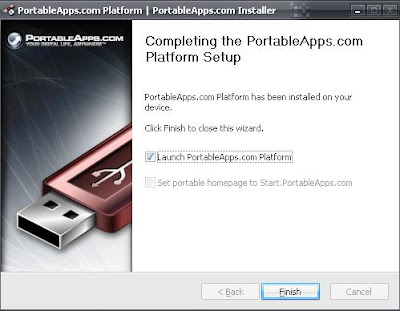
  14. After the installation is complete, give a check in the launch and then click finish PortableApps.com Platform. 
  15. Installing a Portable Applications For Your NetBook
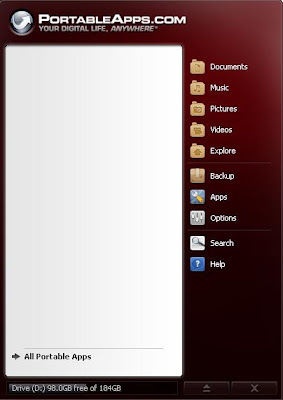
  16. Will automatically exit the application icon in your taskbar. At first glance the menuinterface is similar to the Start Menu of Windows Vista. 
  17. Installing a Portable Applications For Your NetBook
  18. click menu All Portable Apps to start to install the application is needed.

For now if the application is already installed on your netbook, then you no longer need to install many applications such as Office or any Browser. Due to the PortableApps application has summarized it all into one portable package in the Flash Disk.

So where you need it later application, you simply stay bring your Flash Disk for use in other netbooks.

Any Tricks article that's on Installing a Portable Applications For Your NetBook, may help you. Thank you for your visit, we may learn useful computer online.
Read more ...

How To Replace Hard Disk Netbook With Easily

How To Replace Hard Disk Netbook With Easily
How To Replace Hard Disk Netbook With Easily - Learn to be a technician laptop? At first you hesitate not to loading-unloading laptop? But it is really easy when we do it well and thoroughly. In dismantling your netbook should be careful not to damage other parts. So that his work has not increased.

well, For those of you who want to upgrade your laptop hard disk would not have hesitated to do so because it is not too difficult to follow the recommendation from the trick this time. Upgrade your hard disk is usually necessary to increase the shelf life of hard disk data storage media. Because laptops are generally only has one slot for the hard disk, then automatically you have to replace the old hard disk. Check first if using SATA or IDE technology.


If it is clear, this Replacement Laptop Hard Drive with easily:
  1. Inspect your laptop warranty, if still under warranty do not do the replacement hard disk. Because usually the laptop is still sealed and the resulting damage to the dismantling of hard disk seal.
  2. The laptop is off.
  3. Your laptop behind and looking breach-block usually have 1 or a few screws.
  4. Open the screws with a screw driver, and turn to the left and lift the lid.
  5. To remove the hard disk if there is any open cover plate screws. Pull breach-block ifthere is, remove the hard drive from the motherboard connector carefully.
  6. Prepare a new hard drive, pull breach-block if have. Insert the hard disk into place, with the exact position of the connectors on the motherboard connector.
  7. When you're done, check your work again.
  8. And then lock the cover with screws.
  9. Turn on your laptop.
  10. Finish.

Any Tricks article that's on How To Replace Netbook Hard Disk With Easily, may help you. Thank you for your visit, we may learn useful computer online.
Read more ...

Trick How To Keep Battery Netbook Durable And Long Lasting

Trick How To Keep Battery Netbook Durable And Long Lasting

Trick How To Keep Netbook Battery Durable and Long Lasting - Notebook Battery is the most important part of a netbook that can be turned on wherever we are, but many people have asked how to care for so long-lasting laptop battery. In the previous article I discussed about the 10 best netbooks in 2012. Surely once you buy a netbook, you need to take care netbook and also the most important netbook battery maintenance. That's I'll tell you some Tricks How To Keep Netbook Battery Durable and Long Lasting :


Never use the charger at random.
If at any time laptop charger is broken, do not ever use the charger is not compatible with our netbook. At least we do not use the charger from a different laptop brands, though the situation was an emergency. Because each has a character and a battery charger current and voltage independently. Wearing an incompatible charger can make your laptop battery can be damaged even heat and explode.

Do not assume the netbook
Wearing a netbook by lap can block fan ventilation holes so the netbook and the netbook battery becomes hot quickly. It becomes more dangerous to our body temperature is too warm. Excessive heat causes the cell-cell battery netbooks we become easily damaged.

Always check the cleanliness of the battery.
Clean the dust is always in contact metal-metal battery or existing, must be no paper or metals that could connect these contacts. If that happens, we have a netbook and a battery short circuit. Even the smallest bit of dust that could potentially make the battery connector is corroded and rusted metal.

Do not use the netbook on the carpet, sofa, mattress or other soft places.
If you want to use the netbook in place of the above, use a hard base or use the fan again ngetrend cold today. Because if not .. then the laptop will experience overheating because there is blockage of vents by carpet.

Avoid shocks, pressure or hard impact on the battery or the laptop.
Because in addition to a defective battery can be damaged if the netbook you also beturan hard hit, especially the most vulnerable are the ICD and the hard disk.

Do not put the netbook in hot, like in the hot sun, and so on.
In addition to hot laptop, you would not feel comfortable when playing in the sun or a netbook in the room that this could lead to panas.hal netbook, your laptop is overheating finally broken.

Do not use the Netbook in place that is too moist or wet.
It is feared is the presence of water that can damage circuits and our laptop battery. We always keep the laptop from water and excessive heat.

Do not be too long to charge the battery.
Make sure you disconnect your charger if the battery is full. Do not be too long to charge the battery if it is full, let alone to be left to sleep, it may accelerate the age of cells that are in your notebook battery.

See the book carefully.
Some laptop brands have special rules regarding their products. Read the manual book your laptop and make sure we use it as a guideline. 


In addition to the above, at this time I will also talk about some simple guidelines for caring for another notebook battery / laptop. 

How long will my battery can last?
Notebook battery will decrease with time if you use them or not. Even if Li-Ion battery industry does not publicize this fact, battery clock starts ticking the moment you put together. Elements within the battery will react, and eventually the battery will not be able to supply enough power for your notebook. In addition, your battery designed to last between 300-800 charge cycles / recharge. And will gradually decrease its ability to supply power to the notebook.

Trick How To Keep Battery Netbook Durable And Long Lasting

In general, notebook battery will last between one to three years. You might be able to slow the decline in ability, but can not stop the process. Battery temperature, means and frequency of use will affect the notebook battery lifespan. You can slow this process with care in accordance with some care and maintenance.

Temperature
Low temperatures will slow the process of discharge (lose charge while connected to electrical power) and the aging process of the elements within the battery. In contrast, the high temperature will shorten battery life. Leaving your battery when connected to AC power causes the temperature of the battery increases. Remove and keep the battery at cold temperature will slow the aging process. Keeping your notebook in a hot environment is also not good for batteries.

Usage
Lithium-Ion batteries used in notebooks are designed to be used around 300-800 cycles charge / discharge. Some of these cycles are used when you let your battery installed when the notebook on AC power. On AC power, the notebook will routinely remove the battery when it reaches the level of knowl-charge's specific (ie 95%).Removing the battery and store it in a cool dry place and will protect a few cycles.

User habits
Li-Ion Battery is not affected by memory effect (the battery needs to be used until completely discharged before recharging to avoid the loss of capacity) like older rechargeable batteries. Recharge cycles will increase the full discharge capacity loss per cycle. Some times the 'content-to-wear part' is better than one 'wear out'. However, you also need to calibrate your battery regularly.


When the AC power, the battery should be removed or installed?
Some things to consider, if:

You remove the battery while on AC power:
Pro:
• Preserves charge cycles
• Leaving the battery at low temperature, thus slowing the aging process

Cons:
• Loss of function of a battery backup when power outage
• Data can be lost or damaged even if no power from the battery backup function
• Keep in UPS (uninterruptible power supply) to replace the backup function

Trick How To Keep Battery Netbook Durable And Long Lasting

You let the battery is attached:
Pro:
• Battery serves as backup if power is suddenly dead.
• It is easier and efficient to carry
• The battery does not need heating time (as if stored dilemari es)

Cons:
• Loss of some recharge cycles
• The temperature of the battery increases and decreases its ability to result in more rapid


Age extend battery
  • Calibrate the battery with a 'wear out' every 30-time charge to maintain the accuracy of the elements within the battery. Use your notebook until the battery is completely used before charged.
  • Avoid repetition 'wear out' a regular basis. Li-Ion batteries lose less storage capacity when charged though not consumable.
  • Baterau off and store in a cool, dry place. Optimum charge level is 40% for long storage.Storing a battery with low power will cause permanent damage. Because of that, usually when you buy a new notebook, the battery has been filled about a quarter to a half.
  • If you store batteries in the refrigerator, use a sealed plastic bag to avoid moisture.Allow the battery to warm to room temperature before being used or pulled his charge.

Estimated life of the battery
Some programs claim to be able to estimate the life of the battery. But of course this is often inaccurate.
Applications that are installed on a notebook can provide more accurate results.
Try to do some quick tests to see if your battery is 'drop' or not. Charge / full recharge the battery to 100%, then, used to play VCD / DVD, while browsing on the internet. In general for a new notebook, the battery will last approximately 2 hours.

If you buy a used notebook, this method is able to give accurate results. If the moment the battery meter showed a significant reduction, it is certain notebook batteries are not good.


Consider a battery backup?
As mentioned above, the elements of the battery capacity will decrease over time, whatever you do. Therefore, do not rush to buy a spare battery, if only to slow the decline in the ability of the two batteries.
Buy, if you really need backup power, for use without a power outage.

Trick How To Keep Battery Netbook Durable And Long Lasting


Can I use a battery of other brands if the fitting is installed?
And can I use a generic battery?
Each laptop battery fitted microchips designed specifically to meet the requiredspecifications for the laptop in question and is associated with an application that monitors battery usage. For example, certain in laptop application is programmed to alert the battery will be exhausted at a certain level and turn off the laptop automatically at a certain level as well. If you use batteries from other brands, may be, the setting isnot appropriate. The program can suddenly ordered the laptop to turn off automatically,because the mismatch between the chip inside the battery danmikro program.

Trick How To Keep Battery Netbook Durable And Long Lasting

In addition, generic batteries are cheap, often not made ​​with good security standards.Instead batteries from leading brands use components that have been tested andpassed the safety test. Therefore, the price of original batteries are usually expensive,because they have to use expensive components. Several instances of generic batteries do not work in certain laptops, because laptops are in the application is programmed to reject the generic battery to avoid battery consumption is dangerous.

There are some people who do not have problems with generic batteries. But you should consider whether it is appropriate to save a little money with the potential risk to be faced.


What about product recall and the battery that exploded?
Around the year 2006, there were reported cases of exploding batteries, so somevendors pull their products off the market. But in line with current technological developments, the case was barely heard from again.
Article about it you can read here


Some practical tips:
  • Heat is your enemy. Avoid to put your battery in place of heat, such as in a car at the time of day
  • Usage until exhausted is not good for Li-Ion battery. Should do the refilling when it reaches the level of 10-20%.
  • Calibrate your battery every 30 charge cycles. Let the battery is used up, to keep the pointer on the laptop remains accurate.
  • If you are going to use electric power in a long time, you can extend the battery life to take it off and keep it in storage
  • Store a dry and cold with the condition of the battery is 40%. Some experts advise to keep it in the fridge. Use a sealed plastic bag to get rid of moisture.
  • Do not enter into the freezer to be frozen.
  • If you want to use again, allow to warm to room temperature before being used again.
Read more ...

Set Windows Right-Click Menu With FileMenu Tools

Set Windows Right-Click Menu With FileMenu Tools
Set Windows Right-Click Menu With FileMenu Tools - The existence of a variety of menu when we right click on Windows, either the file or folder is pretty much help us accelerate the work. But it is not uncommon right-click menu(context menu) too much and sometimes it feels slow to appear. The solution is to set up their own menu with free software FileMenu Tools.

When adding the program / ​​software is not uncommon these software add menu when we right-click the file or folder. Maybe some of the menu is quite helpful, but if too much,sometimes inconvenient when I have to choose the menu and roads that do usually do uninstall the program. Even sometimes the menu we never used at all.

Set Windows Right-Click Menu With FileMenu Tools

With FileMenu Tools, we can make the right click menu (context menu) windows. Some features include:
  • Adding a menu to run the operations of the selected file or program
  • Add specific commands that can run the program or other application, do the copy / move to a specific folder or even to delete certain files
  • Setting the menus that appear on the menu "Send to .."
  • Enable or disable the menu that was added by another application or program
  • Adjust or shift the position of the menus that appear

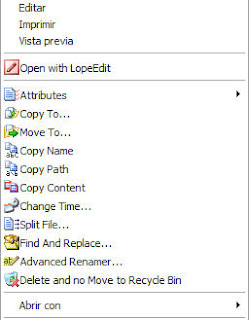
FileMenu Tools provides an innate feature that we can add the context menu (right-clickmenu windows), such as Find and Replace, Delete locked file, Permanent Delete,Change Icon, Run the file with a particular argument or parameter (for file exe, com, andbat) , do the copy / move files, copy files and other locations. Learn to see the features inherent file operations in FileMenu Tools. 

Set Windows Right-Click Menu With FileMenu Tools

Use of FileMenu Tools
After the run, are 3 main menu shown in Tab, the Commands of FileMenu Tools, "SendTo ..." menu and Command of other applications. Each user can be briefly described as follows:
  • Commands of FileMenu Tools, to add a right click menu on a file or folder. We can choose a variety of options or parameters of the properties and perform actions from the Action
  • "Send To ..." menu and, for the set menu on the sub menu "Send to ..."
  • Command of other applications, to organize the various right-click menu in Windows and is usually added by other applications. Having removed the check mark, click the icon "Apply changes", then right-click menu will automatically disappear / appear without having to restart.

This application is very useful, especially when you right-click menu too much, so it is necessary to disable (remove) the menus that we rarely use, or when we are doing operations on files / folders and would like to add right-click menu for quick do the job.

The program can be used for Windows XP, Vista and Windows 7 both 32bit and 64bit.In addition to the installer version is available, there is also a portable version. To use,please download FileMenu Tools (Installer 6.5 MB and 5.7 MB Portable)
Read more ...

How To Check Temperature PC Components With Open Hardware Monitor

How To Check Temperature PC Components With Open Hardware Monitor
How To Check Temperature PC Components With Open Hardware Monitor - Monitor or check the temperature of various components (hardware) computer now is not a difficult thing again and it is important to do regularly. It is very easy to do, what else it can be done using free software Open Hardware Monitor. So to check the temperature of computer components you do not need to pay anything, but free.

As the name suggests, this software is not only free but open source software and includes one full-featured enough monitor. Open Hardware monitor supports a variety of chips used in a variety of computer motherboards today.

Because it is open source, we can also get the source code and can be learned for those who have programming skills. In addition, Open Hardware monitor in addition to running on Windows can also run on Linux using Mono Framework.

How To Check Temperature PC Components With Open Hardware Monitor

How To Check Temperature PC Components With Open Hardware Monitor

Hardware monitor some features include:
  • Monitor the temperature range of hardware (hardware) computer in real time(continuous)
  • Capable of monitoring components: hard drives (HDD), CPU (including each core),round Fans (cooling fan), temperature of the system (motherboard), VGA (including voltage, GPU temperature and fan rotation).
  • Displays a graph or plot various temperature / components in the monitor
  • Showing information as a gadget windows (appear on the desktop) 

Comparison with CPU ID Hardware Monitor
So far, the software monitors the temperature of computer components that I use frequently is Hardware Monitor, with a simple display and is able to monitor the various components. In terms of appearance, Open hardware monitor displays information exactly as CPUID Hardware Monitor.

In terms of the ability of the monitor, when I try to monitor on a desktop computer (PC),which monitored the same components, except that Open Hardware Monitor provide more information for the CPU and VGA, namely by adding information such as clock and vga memory and processor load is used (either for CPU / VGA) as well as information fan (fan) used VGA. 

How To Check Temperature PC Components With Open Hardware Monitor

In addition, to control the GPU fan (fan VGA), while the right-click no option to set what percentage of the power / speed to be allocated. From this brief comparison to PC Open Hardware Monitor looks superior.

But when I try on Laptop / Notebook, Open Hardware Monitor than a little behind with Hardware Monitor. Hardware Monitor in addition to be able to monitor the various components such as the PC, there are additional Laptop Battery monitor, while the Open HM is not available (perhaps because his version is still beta, I hope the final version was able to include this feature).

In addition to monitoring, Open Hardware Monitor also provides more features to display the plot / graph (although when I try to not perform), and can display information as a gadget on the Windows desktop with an attractive appearance. Open Hardware Monitor supports Windows XP, Vista, 7, and also both 32bit and 64bit Linux.

Download Open Hardware Monitor (255 KB)
Read more ...